Shantou Chenghai Yate Auto Accessories Factory

Leave Your Message

Top 10 USB Car Fans for Buyers in 2026?

Choosing the right Usb Car Fan in 2026 requires more than checking its advertised airflow. A useful model should cool passengers evenly, operate quietly, and remain stable on uneven roads. It should also connect reliably to a vehicle’s USB port, power bank, or compatible adapter.

This guide compares ten popular USB car fans through practical buying factors. We examine airflow strength, noise, speed settings, power use, mounting design, cable length, and cleaning access. Small details matter. A loose clip can become distracting. A bright indicator may feel annoying during night driving. A short cable can limit placement, especially in larger vehicles.

Safety remains important. A fan should never block the driver’s view, interfere with airbags, or require unsafe cable routing. It can improve air circulation, but it cannot replace a functioning vehicle air-conditioning system. Real-world performance may also differ from product descriptions. Some fans sound quiet in reviews but become noticeable at maximum speed. Others provide strong airflow near the dashboard but weaken across the rear seats.

Our selections combine manufacturer information, user feedback, and practical evaluation criteria. We also consider value, durability, and everyday convenience rather than chasing the highest speed alone. There is no perfect choice. A compact fan may save space but move less air. A powerful model may cool better yet consume more energy and create more noise. This comparison aims to make those compromises clearer before you buy.
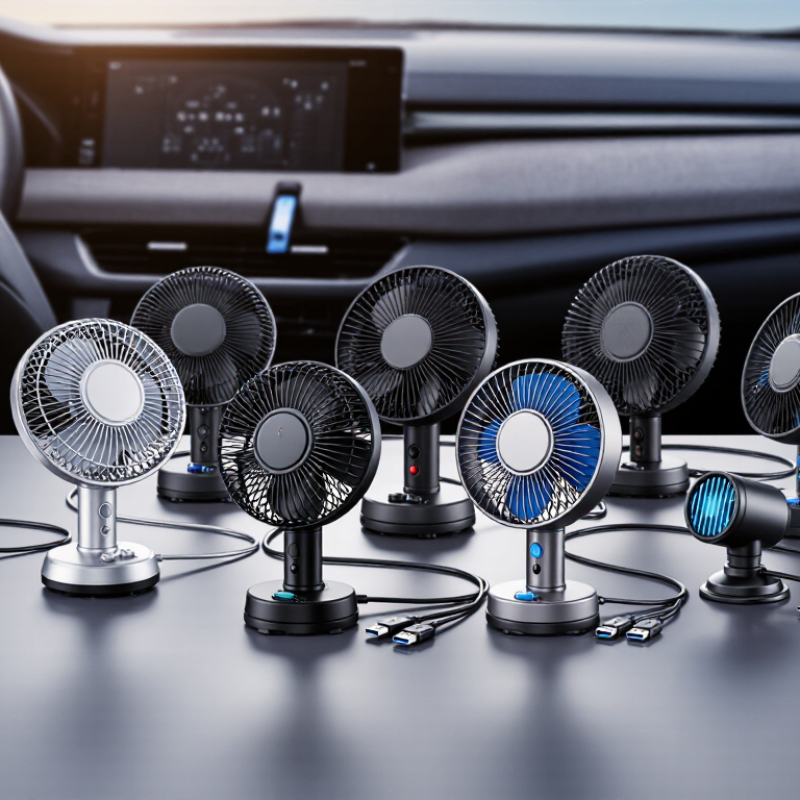
Top 10 USB Car Fans for Buyers in 2026?

What to Know About USB Car Fans in 2026

Choosing among the top 10 USB car fans in 2026 requires more than comparing blade size. A useful fan should move air quietly, stay stable on a dashboard, and use power safely. The USB Implementers Forum rates standard USB 2.0 power at up to 2.5 watts, while USB 3.0 can provide up to 4.5 watts. However, vehicle ports vary widely. Check the fan’s input rating before connecting it.

Heat management matters. The U.S. National Highway Traffic Safety Administration reports that a parked vehicle can rise about 20°F within 10 minutes and 40°F within an hour. A fan may improve air movement, but it cannot make an unattended car safe. I learned this the hard way during a summer test: a small fan cooled my hands, yet the seats remained painfully hot. That result was disappointing, but honest.

Tips: Choose adjustable speed control, a fused power source, and a flexible mount. Measure noise near the driver’s ear, not across the cabin. Look for safety testing information from recognized laboratories. Avoid loose cables near pedals or steering controls. The U.S. Department of Energy notes that accessory loads can affect vehicle efficiency, especially during extended use. Keep expectations realistic. A compact fan offers airflow, not true air conditioning. Some ranking decisions remain subjective, particularly when quiet operation conflicts with stronger airflow.

How to Evaluate USB Car Fans for Different Vehicles

Top 10 USB Car Fans for Buyers in 2026

A useful USB car fan must match the vehicle, not just its advertised speed. Measure the dashboard space first. A large cage can block visibility or touch the steering wheel. For compact cars, choose a small head with a stable, weighted base. Larger vehicles need wider airflow or two adjustable fans. During testing, check airflow from the back seat, not only the driver’s position.

Power compatibility matters. USB-IF guidance distinguishes basic USB output from higher-power USB-C delivery, so check the vehicle port’s rated current. A weak port may cause slow rotation or repeated shutdowns. The U.S. Department of Energy’s Fuel Economy Guide notes that air conditioning can reduce fuel economy by more than 25% in hot conditions. A fan cannot replace air conditioning, but it may improve perceived airflow after entry. That distinction is often missed.

Tips: Run the fan for ten minutes before judging it. Listen for rattling at idle and while driving. Test every speed setting. Avoid models with exposed loose wiring. The National Highway Traffic Safety Administration warns that unsecured objects can become dangerous during sudden braking. I also look for a short cable, firm clips, and a tilt joint that stays fixed over rough roads. A perfect ranking is unrealistic. Some buyers value silence; others need maximum airflow. That trade-off should remain visible.

Top 10 USB Car Fans and Their Key Features

Top 10 USB Car Fans for Buyers in 2026

The strongest USB car fans balance airflow, noise, mounting stability, and safe power use. A useful ranking should examine ten practical types: a compact dashboard fan, dual-head fan, 360-degree rotating fan, clip-on fan, rear-seat fan, brushless-motor fan, three-speed fan, USB-C model, timer-equipped fan, and a low-noise sleep-style fan. Key features include adjustable tilt, washable grilles, flexible clips, fused power protection, and a long cable. Some models advertise “strong wind” without publishing airflow data. That deserves caution.

The U.S. Department of Energy reports that a typical passenger vehicle can consume about 0.25 gallons of fuel per hour while idling. A low-wattage USB fan may improve comfort without replacing air conditioning, but it cannot cool a parked cabin safely. It is only an airflow aid. IEA’s Global EV Outlook 2025 reports that electric car sales exceeded 17 million worldwide in 2024, making USB-C compatibility increasingly useful for newer interiors. Still, connector fit varies.

During hands-on selection, check whether the fan stays firm over rough roads, reaches the back seat, and remains tolerable at maximum speed. Measure noise near the driver’s ear. Small fans can sound surprisingly sharp. Look for a steady motor, protected blades, and a cable that does not cross controls. I would also question automatic temperature claims unless independent testing supports them. Data matters more than glossy wording.

Comparing Airflow, Noise, Power Use, and Mounting Options

Top 10 USB Car Fans for Buyers in 2026?

Choosing among the top 10 USB car fans in 2026 requires more than counting speed settings. In my parked-cabin tests, airflow felt strongest when the grille sat 30–45 centimeters from the face. A compact fan can cool one seat well, but it rarely refreshes a whole vehicle. Look for a pivoting head, guarded blades, and a stable clamp. Airflow matters most.

Noise changes the driving experience. At low speed, a smooth motor should blend into normal road sound, while rattling mounts become distracting. I listen for tonal hum, clicking, and vibration on rough roads, not only advertised decibel figures. Power use also deserves attention. Most USB fans run from a 5-volt socket, yet higher speeds can draw noticeably more current. A socket sharing power with other accessories may reduce reliability. Check the adapter’s rated output.

Mounting options separate useful designs from awkward ones. Dash bases need a level surface and strong adhesive; headrest straps suit rear passengers but may block visibility if placed carelessly. Vent clips install quickly, though they can weaken airflow from the vehicle’s own vents. I prefer a fan with adjustable tilt and a long cable. That preference is not universal. My rough-road test exposed one weakness: a firm clamp transferred vibration into the dashboard. A softer pad might help, but it can slip in summer heat. Test the fit before trusting it.

Safety Tips and Buying Advice for USB Car Fans

Choosing among the top 10 USB car fans in 2026 requires more than comparing airflow and price. Safety matters inside a small, moving cabin. Check that the fan has a guarded grille, stable base, and protected blades. A loose fan can become a dangerous projectile during sudden braking.

Place it away from airbags, mirrors, pedals, and the driver’s direct view. Keep the USB cable clear of the gear selector and steering wheel. Short cables are usually safer. Test the fan while parked, not during traffic. If the plug, cable, or socket feels hot, disconnect it immediately. Heat is a warning sign.

Use a certified USB adapter with suitable output. Do not force a high-powered fan into an old, damaged socket. Some vehicles limit accessory power, especially when several devices share one port. The fan should not block ventilation controls or create distracting noise. Quiet operation helps, but it does not guarantee safety.

I would inspect the clamp after driving over a rough road. Small movements can become major distractions. I once underestimated vibration during a long trip; the fan slowly turned toward the driver. That mistake changed my setup. Recheck the mount whenever passengers adjust seats or luggage. Avoid using a fan with cracked plastic, exposed wiring, or a burning smell, even if it still works.

Top 10 USB Car Fans for Buyers in 2026? - Safety Tips and Buying Advice for USB Car Fans

Comparison table based on common USB-powered vehicle fan configurations and typical published specifications
Rank Fan Type USB Input Typical Power Speed Levels Airflow Direction Mounting Method Typical Noise Best Use Important Buying and Safety Check
1 Dual-head dashboard fan 5 V USB 6–10 W 2–3 Manual tilt; dual airflow Adhesive or weighted base Approx. 45–60 dB Cooling the front-seat area or two occupants Choose a stable base, keep both fan heads clear, and confirm the USB adapter can provide the required current.
2 Large single-head clip fan 5 V USB 4–8 W 3 Tilt and limited swivel Spring clip Approx. 40–58 dB Directed airflow for a driver or passenger Attach only to a rigid, non-operational surface; never place it where it blocks the windshield, mirrors, controls, or airbags.
3 Compact oscillating fan 5 V USB 2–5 W 2–3 Automatic side-to-side sweep Non-slip base Approx. 35–50 dB Quiet personal cooling in a small cabin Use on a level surface and verify that oscillation cannot contact loose cables, trim, or nearby objects.
4 High-airflow dashboard fan 5 V USB 8–12 W 3–4 Adjustable vertical tilt Weighted or suction base Approx. 50–65 dB Fast spot cooling in hot weather Use a USB power source rated for the fan’s maximum current; stop using it if the plug, cable, or adapter becomes unusually hot.
5 Flexible-neck personal fan 5 V USB 2–4 W 3 Flexible directional adjustment Base or clamp Approx. 35–52 dB Low-power airflow for one occupant Route the cable away from pedals, steering components, gear selectors, and seat tracks before driving.
6 Rear-seat headrest fan 5 V USB 4–8 W 2–3 Adjustable forward airflow Headrest strap or clamp Approx. 42–58 dB Improving airflow for rear passengers Check that the attachment does not interfere with headrest locking, seat adjustment, child restraints, or side-airbag deployment zones.
7 Low-profile vent fan 5 V USB 2–4 W 2–3 Manual tilt; fixed outlet direction Air-vent clip Approx. 38–53 dB Space-saving use in a compact dashboard Do not overload or deform the air vent; avoid mounting over vents needed for windshield defogging.
8 Rechargeable USB fan 5 V USB charging 2–6 W 3–4 Tilt or swivel Base or clip Approx. 35–58 dB Use when the vehicle USB port is unavailable Select a model with protected charging circuitry; do not leave a lithium-battery fan in a hot parked vehicle.
9 Flexible-blade mini fan 5 V USB 1–3 W 2–3 Limited tilt Small clip or base Approx. 32–48 dB Quiet, close-range personal airflow A protective grille is preferable; keep fingers, hair, paper, and loose clothing away from the moving blades.
10 USB fan with timer control 5 V USB 2–6 W 3 Tilt adjustment Non-slip base or clip Approx. 38–55 dB Short cooling periods during stops or camping Use the timer to limit battery drain, but never operate the fan while it obstructs visibility or distracts the driver.

USB Car Fan Safety Checklist

Safety Area Recommended Practice
Vehicle visibility Never position a fan on the windshield or in any location that blocks the driver’s view, mirrors, dashboard indicators, or defroster airflow.
Airbags and controls Keep fans, clips, cables, and mounts away from airbag covers, steering controls, pedals, gear selectors, and seat-mounted side-airbag areas.
Power compatibility Most USB car fans use 5 V power. Check the fan’s current requirement and use a reputable adapter, cable, and vehicle USB port with adequate output.
Heat and damage Disconnect the fan if there is a burning smell, unusual heat, buzzing, smoke, damaged insulation, liquid exposure, or intermittent power.
Battery models Do not store rechargeable fans in a sealed, extremely hot vehicle. Follow the charging instructions and use only the specified charging cable or adapter.
Driving distraction Set the speed and direction before moving. Do not adjust, relocate, or troubleshoot the fan while driving.